Search This Blog

Wednesday, June 15, 2011

Microsoft Office 2010 Adopted 5 Times Faster Than Last Version

By Dina Bass


Microsoft Corp. (MSFT), the world’s biggest software maker, said corporate customers adopted the Office 2010 product five times faster than the previous version.


Sales to businesses outpaced those of Office 2007 through the first nine months of product availability, Redmond, Washington-based Microsoft said today. The 2010 software suite is the fastest selling update among regular consumers, and almost 50 million of them are using the Web-based versions of Office programs Microsoft released to combat Google Inc. (GOOG)’s Apps.


The company is announcing the numbers in a blog on the one- year anniversary of the product’s release, Takeshi Numoto, an Office vice president, said in an interview.


Microsoft’s Business Division unit, mostly sales from Office, has been exceeding analysts’ estimates, helping revenue growth as the Windows operating-system business loses some consumers to Apple Inc. (AAPL)’s iPad. Mountain View, California-based Google has been trying to steal corporate and government customers from Office with online word-processing and spreadsheet software.


“The Office business is the one business people feel pretty good about,” said Brendan Barnicle, an analyst at Pacific Crest Securities Inc. in Portland, Oregon, who rates the shares “sector perform.” “It’s not really coming under the same kind of attacks” as Windows and mobile software.


Google Apps has been out for several years and there hasn’t been mass defections, he said in an interview.

Cloud Computing

Deployments of Office 2010 are also beating those of Office 2003 “by a pretty significant margin,” Numoto said. Nine of 10 customers in a Microsoft satisfaction survey said 2010 was the best Office release ever, he said.


Sales in the business division, the company’s biggest, rose to $5.27 billion last quarter, exceeding the $4.9 billion average of analysts’ estimates compiled by Bloomberg.

The Office business is being challenged by the growing popularity of so-called cloud software delivered over the Internet, which is allowing companies to choose from more options, Barnicle said. Delivering software as a service over the Internet may squeeze Microsoft’s profit margins, he said.

Monday, June 13, 2011

Microsoft Office 365 still a beta service, says analyst

Cloud productivity apps still riddled with problems
Microsoft Office 365 cloud service is likely on the verge of exiting beta and entering general availability. CEO Steve Ballmer revealed that the service will launch this month and will be giving a speech about the service's future on June 28.


But is Office 365 really ready to ditch the "beta" tag? One analyst who has been testing Office 365 for a few months says no, and a quick look at Microsoft help forums shows that numerous beta testers are experiencing problems.

"I'm a big fan of Office 365. I think it's going to do well," says analyst Paul Burns of Neovise, who spent 20 years as a software engineer and senior product manager at HP, before becoming an industry analyst. "But if they are moving out of beta at the end of June, then yes, I'm surprised."

Burns signed up for the Office 365 beta for himself and five part time employees, and plans to continue using the service once it becomes generally available. Burns is using Exchange for email as well as SharePoint, Lync, Office Web Apps and the regular version of Microsoft Office.

One missing capability, in Burns' opinion, is the ability to import contacts from, say, an Outlook client into a shared global address list that can be accessed by all employees through an Exchange server. Currently, Microsoft requires Office 365 customers to either manually enter each email address one by one, or use

Windows PowerShell.

Burns isn't the only one complaining about this, as a help forum thread shows.
A Microsoft support specialist told users on May 12, "If you'd like to import a list of contacts into your Global Address List, you'll need an Enterprise subscription. In Enterprise, you can use Remote PowerShell." A week later, the Microsoft moderator followed up and said, "Small Business subscribers can now use Remote PowerShell."

But PowerShell requires users to work in a command line interface, and "not everyone has the expertise to do that," Burns said. It's also time consuming.

Because of the global address list snafu, and another issue that made it difficult to create properly functioning email aliases, Burns says, "I went to download PowerShell, but very quickly I realised this is going to be time consuming, and if I write the script, how do I test it? How do I know it's right? Now I'm afraid to run the script on my data. What if I biff it and delete all my stuff instead?"
One Office 365 beta user complained in the global address list help forum, "This is another example of how such a basic requirement from any business cannot be executed unless you have the Enterprise package. Why the heck should you need to have the Enterprise package simply to be able to import contacts into the GAL?"

Microsoft said it provides tools to small businesses to migrate users and mailboxes from other services. "Office 365 for small businesses is designed specifically for smaller businesses and professionals who are looking for cloud-based productivity tools without the IT hassles," Microsoft said.

At the same time, Microsoft did not deny that it requires PowerShell to import addresses into the Global Address List. PowerShell is also required to create shared mailboxes for email aliases, which for example would let any employee respond from a generic address, such as "sales@company.com."

We received no word from Microsoft on whether this will change once Office 365 exits beta.
"In this beta exchange environment you have to wait an hour before connected mail accounts will be checked. This is unacceptable," a user wrote this week. "Will this change in the final version? If not, I will move on. For me, as a freelancer it is not [a] workable situation."
Another user complained about calendar tasks not syncing properly with a Windows mobile phone, and others had trouble creating SharePoint sites.

Burns also complained about non-delivery of emails, coupled with a status dashboard that is less than informative. In a case where multiple people told him they received bounceback emails while trying to contact him, the Office 365 dashboard insisted there were no problems at all.

"Office 365 can have problems on its side, and I'd like to be informed via an administration tool when that happens," Burns says.

Another nagging issue was configuring Office 365 to work with a website hosted by a non-Microsoft provider. Microsoft offers documentation on how to do this, but Burns says the process was full of snags and took many hours.

Burns temporarily had problems inviting people to Lync meetings via email, until that issue was fixed. He's also struggled with importing Word documents into Office Web Apps while keeping the right format, even though Microsoft has loudly touted its ability to import documents and criticised Google Docs for its failure to do so.

Overall, though, Burns is impressed by Microsoft's new cloud service. "I'm totally impressed with that price, and I'm really impressed that they're letting people even just buy one seat per company," he says.

Thursday, June 9, 2011

Apple Numbers for iPad and iPhone review

By Rob Griffiths
Edited and Republished by Global Information  & Tech


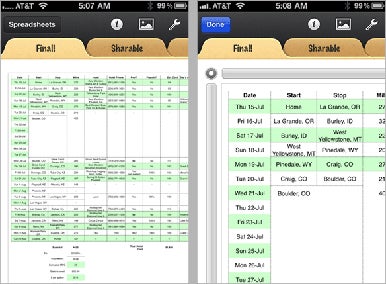
When I reviewed the initial release of Numbers for iPad in April 2010, I noted that it worked well for creating original spreadsheets, and for working on Numbers-native spreadsheets from your Mac, but that it fell short due to its inability to output files in Excel format. Though Apple’s app could read such files, it would convert them to Numbers format. That version of Numbers was also available strictly for the iPad, and not the iPhone or iPod touch.

Numbers 1.4 addresses the Excel issue, adds some other welcome features, and can now be used on the iPhone (3GS and 4) and iPod touch (third and fourth generation) in addition to the iPad. In this review, I’ll focus on what’s new in Numbers, and discuss its use on the smaller iDevices.

The big news in this Numbers update is the small news, that you can now use Numbers on certain iPods and iPhones. While Numbers is a Universal app (one version for all iOS devices), there are a couple of features in Numbers on the iPad that you won’t get to use in Numbers on the iPhone or iPod touch: full screen mode and landscape view.

On the iPad, you can enter a full screen mode to get an overview of your data, and run quick summaries of data sets with a simple flick of your finger. You can’t do much more than that, though, so the lack of this feature on the smaller screened iPhone and iPod touch may not be a major problem for most users.

The lack of landscape mode is more troubling though as many worksheets are laid out in a landscape orientation, and viewing a super-wide landscape spreadsheet on an iPhone in portrait mode can entail a lot of finger swiping. I didn’t realise just how often I used this mode in Numbers on the iPad until I flipped my iPhone around for the first time, expecting to see my worksheet flip, too. When it didn’t, I thought I had the iPhone’s orientation locked, but that wasn’t the case. There simply isn’t any support for landscape mode on the iPhone and iPod touch.

One other minor but potentially annoying “feature” in Numbers on the iPhone and iPod touch is that you can only undo and redo changes by shaking your device, in the iPad app, there’s a dedicated button in the toolbar that doesn’t appear when you run the app on smaller iOS devices. When developing a spreadsheet, I use undo and redo a lot, and shaking the phone over and over again to accomplish that task gets old really quickly. I found myself longing for the iPad’s dedicated button after only a couple of undo shakes.

While Numbers works just fine on the iPhone 4, my biggest problem with it is that there’s simply not enough screen real estate to work productively. It seemed every time I wanted to do something, I was either scrolling or zooming to make sure I had the right cell selected or to see the big picture. It’s also very hard to get a sense for how your finished project will look when you’re laying it out one tiny section at a time.
In short, while Numbers runs just great on an iPhone or iPod touch, I wouldn’t want to use it for anything beyond simple spreadsheets or minor edits to larger projects. There’s a reason that serious spreadsheet jockeys usually have monstrous monitors connected to their desktop machines, there’s no such thing as too much screen space when creating large spreadsheet models.

This release of Numbers includes a number of new and/or improved features that make it easier to do what you need to do, and to share what you’ve done with others. The big news for me was that Numbers can now export in Excel format. Previously it could read but not write Excel files. This means you can now work on an Excel file on your iDevice, and output it back to that same format, so you can share it with those who use Office instead of Numbers.

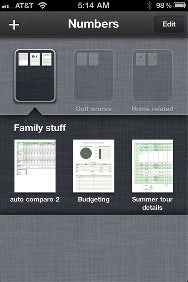
You can now create folders in the spreadsheet browser mode. Folders work here exactly as they do in iOS in general, just drag and hover one icon over another, and you’ll create a folder. For those with a lot of spreadsheets, this is a welcome addition. Also new since the last review is printing via AirPrint printers, though I was unable to test this feature.

Finally, if you’re the type who never reads in-app help, you should break that habit and read Numbers’ in-app help. It contains a lot of usability tips that will help you get the most out of the mobile spreadsheet app. For example, Help reveals how to restrict a drag operation to a straight line. Hold one finger from one hand on the screen while dragging the object with a finder on your other hand.

Not all is perfect in Numbersland, however. Numbers still can’t import hide rows/columns or merge cells, which are two features that many spreadsheets use extensively. In particular, not being able to merge cells (and having merged cells break on import) will cause some layout headaches. You’re also still limited to your iDevice’s relatively meager font collection, and headers/footers and certain features on graphs also won’t survive the transition from the desktop to your iDevice.

Working with files is still more painful than it should be: you’re generally restricted to working with one file at a time (i.e. when copying to/from iTunes), and you can’t open more than one spreadsheet at a time.

Later this year, Numbers (as well as Keynote and Pages) will support Apple’s iCloud service. This should greatly ease the sometimes tricky document management issues related to working with one file on multiple devices. Instead of winding up with multiple copies of the same file on multiple devices, iCloud integration will allow you to have one copy of the file that’s simply synced to all your devices. Create a spreadsheet on your Mac, close it, and you will then be able to pick up your phone and continue working, right where you left off.
While iCloud integration looks like a win, it’s not clear yet what will happen with iWork.com, Apple’s perpetually in beta iWork document sharing service. The features provided by iWork.com aren’t necessarily replicated by iCloud, so I would expect that it will continue to exist, at least in some form.

The potential upside of iCloud support in Numbers is huge, but we’ll have to wait until later this fall to see exactly how well it works, and what becomes of the iWork.com beta programme.

Wednesday, June 8, 2011

Five reasons Microsoft could win the tablet war

                                                                                      Windows 8 could put the IT giant back on top


Microsoft has let it be known that the next version of Windows will run on ARM architecture, and it has demonstrated early builds of Windows 8 (or whatever Microsoft ultimately calls the next OS) on a tablet at both CES 2011 and MIX '11. While Microsoft did a quick 180 on comments from Steve Ballmer confirming a 2012 launch of Windows 8, we know it's coming sometime, and when it does it quickly dominate the tablet market.

Why? Well, here are five reasons that Microsoft could come from behind and ultimately win the tablet war.

1. Uniform experience

Microsoft Windows enjoys a dominant market share of nearly 90 percent for desktop operating systems. While the tablet is a different environment than the desktop, users will appreciate having a tablet that has a look and feel consistent with what they're already familiar with.

2. Software library

Intel informed investors that the ARM version(s) or Windows will not be able to run legacy software, so that could significantly reduce the available software for a Windows tablet. But, Microsoft declared that Intel was out of line in speculating, and it has already demonstrated both Microsoft Office and Internet Explorer 10 on ARM-based tablets.

Even if Intel is correct, and it seems quite possible it could be, Microsoft could still provide developers with the tools necessary to make porting from x86 to ARM as simple as possible. The more users can use the exact same software they are already comfortable with from their desktop, the more successful the tablet will be.

3. Diverse hardware

Apple dominates the tablet market right now, but with Apple you just have the iPad 2. Granted, it has a variety of models, but overall an iPad 2 is an iPad 2. A Microsoft Windows tablet will most likely follow in the footsteps of the current array of Android tablets, with a variety of shapes and sizes to choose from. That diversity gives users more options to choose the tablet form factor and hardware specs that work best for them rather than using the one size fits all approach.

4. Price?

You might notice the question mark. On the one hand, different vendors creating rival tablets will drive some price competition, both in the tablet industry overall and among other Windows tablets. The freedom to use different hardware specs will also enable some cost cutting.
But, as it stands now, Apple seems to have cornered the market on many of the key components of tablets, making it difficult for other vendors to purchase the hardware necessary to make tablets in sufficient volume to bring the price down. So, price is a gray area that may be hard to deliver.

5. No rush

Yes, I understand that Microsoft is not new to tablets. Microsoft has been pushing slate or tablet style PCs for a decade with little success. But, as far as the 'iPad generation' of tablets goes, Microsoft is sitting on the sidelines so far. Microsoft strategy seems to be focused on getting it right, rather than racing to market.
If you look at current iPad rivals, it seems that rushing incomplete or unfinished tablets to market can have dubious results. The Motorola Xoom and BlackBerry PlayBook were both hailed as potential competitors for the iPad, but both hit the street missing key elements and leaving users wanting more, resulting in disappointing sales and a first impression for users that may haunt future tablet efforts.

If Microsoft can get it right and deliver a familiar Windows experience, but in a way that is uniquely suited for a mobile tablet, and deliver it at a price that can compete head to head with the iPad, it could still come out of nowhere and eventually dominate tablets as it dominates desktops.

Of course, I still think that a tablet is not a PC, and that it is a mistake to try and put the Windows desktop in a mobile tablet. In my opinion, Microsoft should be developing a tablet version of the Windows Phone 7 platform because Windows Phone 7 has been designed from the ground up to be a mobile OS.

Tuesday, June 7, 2011

Microsoft plans live TV streaming for Xbox 360

By David Daw


Xbox live service to get selected content over Internet

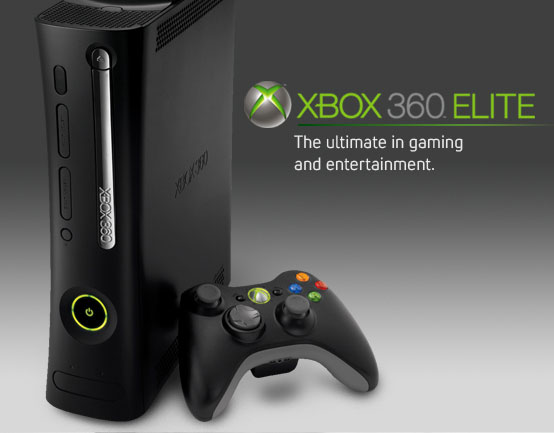
Today at E3, Microsoft revealed plans to bring live streaming television to its Xbox Live entertainment platform this fall. Microsoft said it was partnering with companies in the US and abroad to provide a variety of television content, but the company didn't announce any partners at the event.

The live TV play is just one part of Microsoft's push to make Xbox Live a central entertainment hub in the home. As part of this push, Microsoft also said it would be bringing YouTube to the console. Together with existing content channels like Netflix and Sky Player, the Xbox system is fast becoming a formidable media centre.

Microsoft also announced plans to integrate its Bing search engine into Xbox Live, and to add voice controls using its popular Kinect peripheral.

While the company has yet to announce details for its Live TV services, it seems likely that the American content partnerships would follow the model Microsoft has already established in Europe.

For the past few years, Microsoft has been partnering with content providers like Sky TV in the UK to bring dedicated live content channels to the Xbox. We don't know who Microsoft is in talks to partner with, but Microsoft has said it's looking to increase its partnerships by a factor of ten in the coming year.

Monday, June 6, 2011

LulzSec hackers claim breach of FBI affiliate

InfarGard targeted as a response to cyberwar announcements

Hacking group Lulz Security claimed it had hacked and defaced the website of the Atlanta chapter of InfraGard, an organisation affiliated to the Federal Bureau of Investigation, and leaked its user base.
The group said that they had hacked the InfraGard site after NATO and President Barack Obama had raised the stakes with regard to hacking, by treating it as an act of war.

The website of InfraGard's Atlanta chapter was not accessible late Sunday and returned the message that the site was "under construction" as the future home for the Atlanta InfraGard Member's Alliance. A cache of the site on Google search confirmed that the site was that of InfraGard Atlanta.

InfraGard describes itself an association of businesses, academic institutions, state and local law enforcement agencies, and other participants dedicated to sharing information and intelligence to prevent hostile acts against the US.

The FBI in Atlanta and InfraGard did not immediately respond to e-mailed requests for comments.
LulzSec has recently made news for hacking into PBS. It claimed last week that it had broken into several Sony Pictures websites and accessed unencrypted personal information on over 1 million people.

LulzSec claimed to have obtained about 180 logins from the hack of the InfraGard Atlanta website, and all of them were affiliated to the FBI in some way. It also claimed to have obtained the login of Karim Hijazi, CEO of Unveillance, a network security company.

Hijazi said in a statement last week that LulzSec made threats against him and his company to try to obtain money as well as to force him into revealing sensitive data about his botnet intelligence that would have put many other businesses, government agencies and individuals at risk of massive Distributed Denial of Service (DDoS) attacks.

LulzSec claimed that Hijazi had tried to pay them to attack competitors' sites.

Sunday, June 5, 2011

Sony hacked again as embarrassment mounts

"We accessed EVERYTHING," claim LulzSec hackers

LulzSec, a hacking group that recently made news for hacking into PBS, claimed today that it has broken into several Sony Pictures websites and accessed unencrypted personal information on over 1 million people.
In a statement released on Thursday, the group claimed that it had also managed to compromise all "admin details," including administrator passwords, as well as 75,000 "music codes" and 3.5 million "music coupons" from Sony networks and websites.

The group has publically posted a full list of compromised sites, along with links to documents containing samples of what it claimed was material stolen from Sony.

The compromised databases included one that appeared to contain information belonging to people who participated in a promotional campaign involving Sony Pictures and AutoTrader.com, as well as another involving a Sony-sponsored Summer of Restless Beauty campaign.

Also compromised in the break-in, according to LulzSec, was a Sony music codes database, a music coupons database, and databases from Sony BMG Belgium & Netherlands.
The compromised databases contained "varied assortments of Sony user and staffer information," the group said.

"SonyPictures.com was owned by a very simple SQL injection, one of the most primitive and common vulnerabilities, as we should all know by now," LulzSec said. "From a single injection, we accessed EVERYTHING."

"What's worse is that every bit of data we took wasn't encrypted," the group claims. "Sony stored over 1,000,000 passwords of its customers in plaintext, which means it's just a matter of taking it."

LulzSec said that it had copied and published only a relatively small sample of the information it had managed to access because it did not have the resources to download everything. The group said that in theory it could have "taken every last bit of information," but that would have taken weeks.

The group posted a link to the SQL injection vulnerability it had exploited and invited anyone to verify it personally. "You may even want to plunder those 3.5 million coupons while you can."

In a brief comment sent by email, Jim Kennedy, executive vice president of global communications for Sony Pictures Entertainment, said the company is looking into the claims made by LulzSec, but offered no other comment.

If the breach is as extensive as LulzSec has claimed, it would be the second major compromise that Sony has suffered since mid-April, when intruders broke into its PlayStation Network and Sony Online Entertainment networks. Those breaches resulted in the compromise of personal data belonging to nearly 100 million account holders.


Since then, there have been a series of intrusions at various Sony websites around the world. The attacks, such as the one carried out against Sony Pictures by LulzSec, have been designed largely to embarrass Sony, which has sparked the wrath of many hackers for its hard line stance over copyright and IP protection.
The continuing attacks have become a huge issue for the company. Sony was forced to shut down its PlayStation Network and Sony Online Entertainment networks for several days to fix issues resulting from those intrusions. Even now the networks are still limping back to normal.
So far, Sony has hired at least three external security firms to help patch its networks. It also recently hired a

 new chief information security officer to help coordinate its security efforts. With the company's websites having been routinely broken into, despite such measures, many wonder just how porous Sony's networks are.

Sony itself characterized the PlayStation Network and Sony Online Entertainment intrusions as highly targeted and sophisticated cyberattacks. However, all of the publicly disclosed ones since then appear to have been the result of some fundamental security oversights on the part of the company.

Several of the attacks have resulted from SQL injection flaws that hackers have claimed were extremely easy to find and to exploit.

Thursday, June 2, 2011

Windows 8 gets dramatic smartphone makeover

Radical upgrade but some unhappy

Whatever Microsoft ends up calling Windows 8, a press event at the Computex Show in Taiwan confirms that the company has already given the next version of the world’s most ubiquitous
operating system a bold new smartphone interface.

In the first of a series of videos released to the media, Microsoft’s director of Windows User Experience team Jensen Harris, has underlined the extent to which the new OS will look like and probably integrate with Windows 7 Phone. Microsoft also offered further details in its Computex press event.

Gone is the ‘Start’ button and menu in favour of a mosaic composed of tiled applications and service icons lifted wholesale from the smartphone world. Because Windows 8 will feature a touch interface, swiping to the right one or more times brings up successive screens full of the same icons.

As with a smartphone or tablet, clicking on an app makes it fullscreen while swiping on the left side of the screen brings up other apps that are running, one by one. Each application can be resized on the screen in a variety fo ways.

As well as including a touch keyboard, Microsoft is also experimenting with a ‘thumb’ keypad, which the keyboard into a two thumb-accessible blocks at the left and right hand side of the screen.
As with much of the new user interface, this is clearly aimed at tablet computers, a sector Microsoft clearly sees as at least as important as the laptops and desktop computers that turned previous versions of Windows into the world’s biggest OS.

Under the hood, the new OS will still run conventional Windows applications controlled through the mouse rather than touch, complete with the NTFS and FAT32 file systems. Interestingly, Microsoft clearly sees these as ‘legacy’ beside an as-yet unknown volume of new Windows apps that will run and behave much as they would on a smartphone.

Question marks remains. Can Microsoft serve the needs of users with one OS across so many different types of device?

Its rivals offer a clear break with desktop computing, and are less constricted by the need to convert new users from an established platform. It’s also unclear whether with a growing number of mobile, tablet and smartphone-oriented operating systems available free, users will see the need to write a hefty cheque to Microsoft simply to run an operating system.

Microsoft could offer it free of charge and hope to levy a tax on the apps that run on it, but that would represent a huge change in business model. With so many devices able to access a basic suite of applications without charge, it’s also unclear whether suites such as Office have a future as cloud services away outside the business sector.

It's also less than clear what sort of processing grunt will be needed to run both new-fangled smartphone apps beside older ones. Even slimmed from Windows Vista's bloat, its predecessor Windows 7 still needs more power than most tablets can offer.

What Microsoft does gains by offering people visuals on the new OS, not due for at least a year, is a critical window of feedback and the chance to adjust the design of Windows 8. That alone is a huge change from the inward-looking run-up to previous Windows releases.

The development cycle for Windows 8 is already proving controversial, especially the reported insistence that chip vendors and hardware vendors work together in a way that suits Microsoft's ambitions. Companies such as Acer have expressed unhappiness at being corralled in this way.

Wednesday, June 1, 2011

US government may consider cyber attack an act of war

Pentagon wants to respond to virtual attack with armed force
By Ed Oswald
This is a sign of the increasingly digital world we live in: the Pentagon is set to make it official US policy to consider cyber attacks "acts of war," and respond to them with real world force, the Wall Street Journal reports.

The strategy, which becomes public next month, is intended to both provide guidance to the country's armed forces and make a statement to potential enemies. Cyber terrorism is becoming a big issue for officials, as increasing portions of the country's infrastructure are "online."

This announcement comes just a few days after Lockheed Martin, a major US defence contractor, was the subject of a "significant and tenacious attack." The company has stressed that no sensitive information was exposed during the attack.

According to The Journal, military officials are still in disagreement about how cyber attacks should be handled, specifically when and when not a real life military response is warranted. The Journal says officials seem to be settling on the "eye for an eye" concept, which means that the military would be able to respond to a cyber attack that causes physical damage, injury or death.

Very few virtual attacks are capable of causing this kind of harm, however. If this position is used, many cyber attacks will not constitute brute force retaliation. That's not to say military-employed hackers won't have the right to go in and take down an enemy's computer system in response, though.

Regardless of official strategy, how best to respond to cyber terrorism is something experts and officials have been debating for years since 9/11. Terrorism experts often warn that the next terrorist attacks could be virtual, although so far all cyber attacks have been minor in scope.

3G phones less harmful, researcher says

Smartphones in general may be less cancer-causing

The latest 3G mobile devices like iPhones and other smartphones may deliver a lower dose of radiowaves to the brain than earlier models but frequent use could still cause cancer, a health expert says.

A report released by the World Health Organisation's cancer research wing says radio frequency electromagnetic fields generated by such devices are "possibly carcinogenic to humans".

The International Agency for Research on Cancer (IARC) said heavy usage could lead to an increased incidence of glioma, a malignant type of brain cancer.

However, an Australian researcher who worked on the report with 30 other experts says more research is needed before any real link can be made between mobile phone use and cancer.

"Really, what it's saying is there is an observed association between using a mobile phone and a higher risk of brain cancer," Professor Bruce Armstrong from the University of Sydney told ABC on Wednesday morning.
"But it's also saying that there are perhaps biases in the study or ... other factors that could explain that association."

Armstrong said researchers studied radiowave activity on those who used phones the heaviest and for the longest period, and health risks for average users was "really quite small".

"In the general population, particularly in the younger population, there is just no evidence ... that brain tumours are increasing in a way that would suggest that they are related to the greater amount of radio-frequency energy in our environment," he said.

The 3G technology used by iPhones, Blackberry and other mobile phones also appeared to emit less harmful radiowaves, he said.

But research on these new technologies was still in its infancy.

"A very important observation, really, just based on the technology, is that the 3G phones in fact give a much lower dose to the brain than the previous generations," Armstrong said.
"Whether, for example, the 3G levels are sufficient to cause brain tumours, we don't know at this stage, because most of the research at this stage was done ... on the generation before."

The IARC had previously stated that there was no real health risks associated with long-term mobile phone use.

Armstrong said while health agencies tended to err on the side of caution it was still important people avoided heavy mobile-phone use.

"I think that's a very common principal of public health, that in the face of uncertainty ... it's good to take precautions," he said.

"I would say that the main message out of this study is to avoid exposing your brain to radiowaves from mobile phones."

He said using hands-free devices, texting or using a landline whenever possible would reduce any of the potentially negative health risks for phone users.

More research was needed across the board before any real conclusions could be drawn, he said.
The IARC report that radiofrequency electromagnetic fields generated by such devices are "possibly carcinogenic to humans" has resulted in a Group 2B classification.

The classification will now be assessed by the WHO, which can be expected to provide further advice in due course.

Tuesday, May 31, 2011

Intel developing new hibernation features for PC processors

Rapid Start cuts time to return from suspend state

Intel is adding a pair of new features to chips used in notebooks and netbooks, one of which will allow the devices to turn on within five to six seconds after being put in hibernation mode.

Intel demonstrated the new features on Tuesday at the Computex trade show. Intel's Rapid Start Technology allows for faster turn-on by writing the PC's application state to a dedicated flash drive. By doing this, the PC can quickly reload to its that state without rebooting, even if the battery is removed and then reinserted.
The other feature, Intel's Smart Connect Technology, updates content continuously on the PC while it's in standby mode. The PC will periodically "wake up" and check for email and other information like Twitter posts, and then fall back to standby mode.
The new features will be incorporated into the company's Sandy Bridge chip, the second generation of its Intel Core processor family, by the end of this year. The chip maker will also be adding the features to its Cedar Trail microprocessor, which is designed for netbooks. Intel has previously said Cedar Trail will ship next year.

Standby and hibernate are two modes on Microsoft Windows that allow users to power down their PCs. Standby mode runs on very low power, but is quicker to reload once brought back on. In contrast, hibernate offers greater power savings, but is slower to reload to its previous state since the mode shuts down the computer.

Intel's Executive Vice President Sean Maloney introduced the features during a speech at Computex, and said they were in response to tablet devices. "One of the things we've learned from tablets is the vital importance of system response time. Users simply do not want to wait for a device to boot up," he said.
Tablets represent a market that Intel has been late to establish a presence in. Currently, most tablets, along with smartphones, use processors by Intel's rival ARM Holdings because they are considered more power efficient.

Monday, May 30, 2011

UK game publisher Codemasters hacked

Company says no customer data compromised

Following recent attacks on Sony and Square Enix, it seems that Codemasters, the UK-based publisher of the DiRT series, has been hit by hackers. The company told Gamesindustry.biz that it "responded swiftly" when it discovered there had been an attempt to gain administrative access to the Codemasters website.
"We responded swiftly with a full investigation to isolate the issue, bringing down Codemasters.com for a few hours to ensure no access would be possible, and returned the website after a security hole was closed," a representative from the company said. "While some staff admin names were obtained, passwords were all encrypted."
It doesn't sound as if any customer data was compromised during the attack, but as always in these situations, it's a good idea to change your login details if you use the Codemasters website at all.


Sunday, May 29, 2011

Google shuts down offline Gmail access before HTML5 upgrade

Access still open to outdated Firefox builds

Google this week told Chrome users to switch to outdated versions of Microsoft's Internet Explorer or Mozilla's Firefox if they want to access Gmail when they're not connected to the web.
Gmail has now dropped offline support for Chrome, Internet Explorer 9 (IE9), Firefox 4, Safari and Opera.
The company had announced Gmail's offline shut-off two months ago when it said it was shifting the web mail service's offline support from Gears, its now obsolete plugin, to HTML5. At the time, Google said it would drop Gear from Chrome as of version 12.
The current "stable" build of Chrome is version 11. Even so, that edition doesn't run Gmail in offline mode.
"Beginning on Tuesday, May 24, 2011, users will no longer be able to use Chrome with Google Gears-based Gmail Offline," the company said.

Until Google restores offline support to Gmail with HTML5 this summer, Google recommended that users switch to IE8 or Firefox 3.6, versions that have been supplanted by IE9 and Firefox 4, respectively.
Google plans to provide offline support to Gmail using HTML5 this summer.
"We realize that there will be a temporary gap in Gmail offline access via Chrome," said Google, "and we are working hard to deliver offline capabilities through a new Gmail Offline Chrome Web app as quickly as possible".

Thursday, May 26, 2011

How to cut off online security threats before infection

Sandbox security to keep you safe from Internet threats

Most security tools leap into action only after they've detected a threat and sometimes that's too late (especially if the threat is one that's new and unknown).
The only way to really stay safe while you're online is to work inside a virtual environment, a kind of protected bubble (AKA "sandbox") that operates on your PC but isn't directly tied to it. Trustware's BufferZone Pro creates exactly that kind of protected bubble, thus offering a unique (and theoretically impenetrable) level of protection.
BufferZone Pro was originally paid software, but Trustware has decided to offer the software free to home users.

The software's virtual environment isolates security threats and prevents them from ever touching your PC. With it you can safely download, install and run any application without worrying about Trojan horses, worms, keyloggers, spyware, Adware, phishing attempts or other computer-clogging malware.
This newly free Pro version includes support for USB devices (flash drives, etc.), P2P filesharing, all instant messaging programs and personal files (which get stored in a confidential folder). And unlike many security tools, BufferZone Pro isn't subscription-based, meaning you won't get hit with a bill a year from now. It's free, period.
The software is available in 32-bit editions for Windows XP, Vista, and 7. A 64-bit version is in the works and due to be released by the end of this month. It's not the most novice-friendly tool I've ever used, but if you've had malware problems in the past or you're concerned about the effectiveness of your security software, I highly recommend taking this freebie for a test drive.